Adding A Card To Your PBA Wallet

Created by Bill Savastano, Modified on Thu, 16 Jul at 3:08 PM by LeaguePals Support

PBA

Adding A Card To Your PBA Wallet

How to add and configure a credit card for your PBA dues and entry fee payments in LeaguePals.

Overview

Your PBA Wallet stores the credit cards used to pay PBA membership dues and tournament entry fees inside LeaguePals. You can add multiple cards and assign each one a Card Purpose so LeaguePals knows which card to charge for which type of payment.

Tip

You can set one card for Membership Dues and a different card for Entry Fees, or use the same card for both.

Step-by-Step: Adding a Card
1
Open SettingsTap the menu icon and select Settings, then tap the Wallet tab.
2
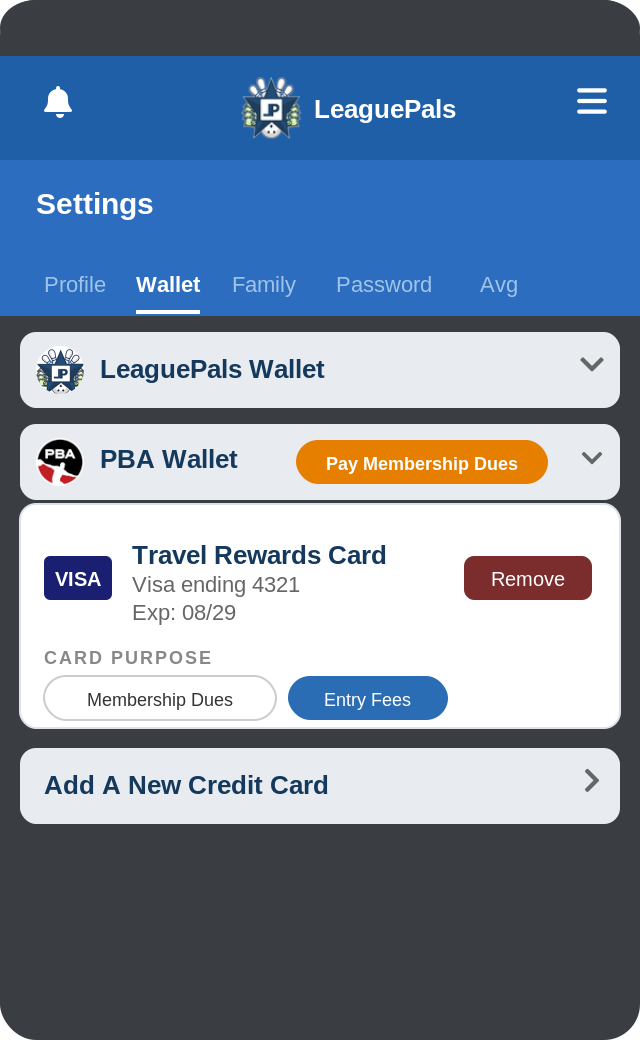
Find the PBA Wallet sectionYou will see two wallet sections: LeaguePals Wallet and PBA Wallet. Tap on PBA Wallet to expand it.
Settings Wallet tab showing PBA Wallet section
3
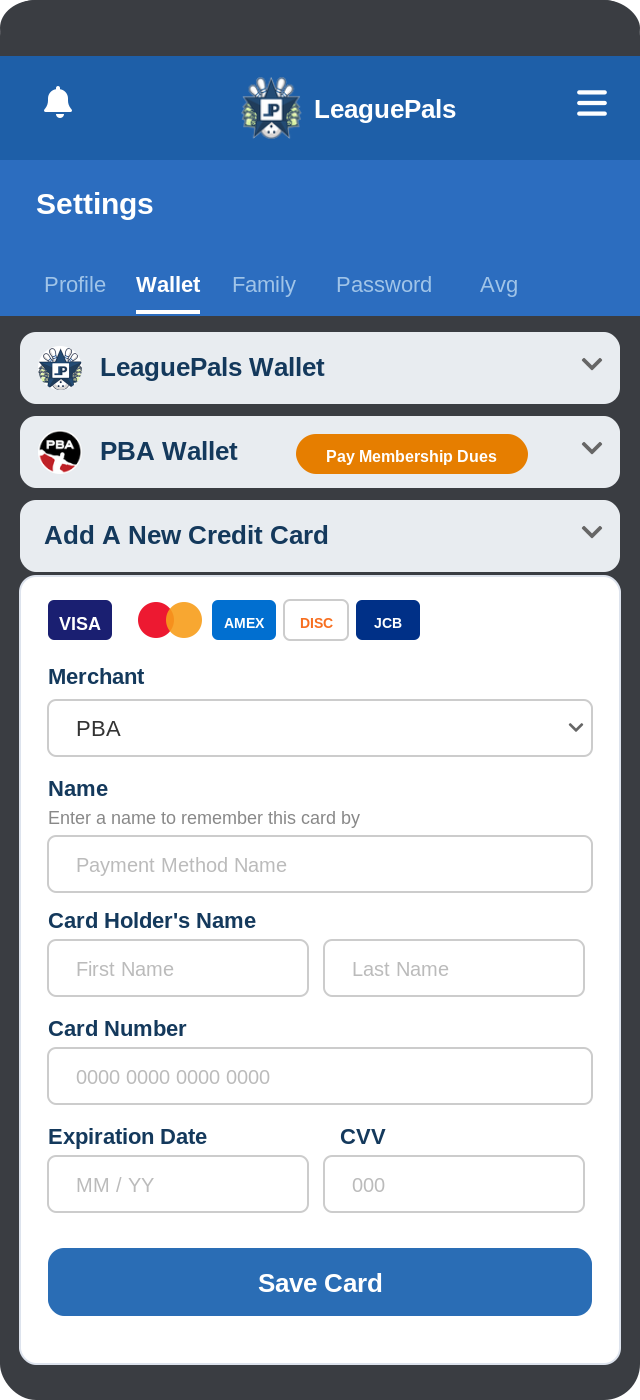
Tap "Add A New Credit Card"Scroll down and tap the Add A New Credit Card row to expand the form.
4
Select Merchant: PBAUse the Merchant dropdown to select PBA. This ensures the card is stored in your PBA Wallet.
5
Enter a Payment Method NameGive the card a name you will recognize, such as Apple Card or Chase Visa. This is for your reference only and does not need to match the card.
6
Enter your card detailsFill in your Card Holder's Name (first and last), Card Number, Expiration Date, and CVV exactly as they appear on your card.
Add A New Credit Card form with fields
7
Save the cardTap Save to add the card to your PBA Wallet. The card will now appear under the PBA Wallet section.

Setting a Card Purpose

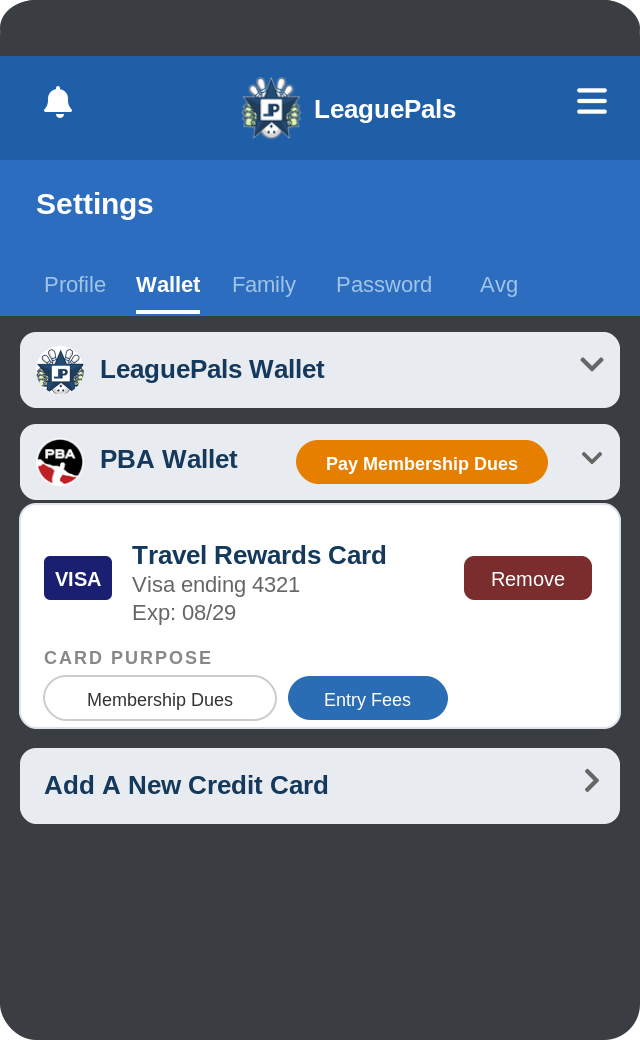
After adding a card, you can assign it a Card Purpose to control which payments it handles. Each card in your PBA Wallet can be set to one or both purposes.
Purpose

Membership Dues

This card will be charged when PBA membership dues are renewed. If no card has this purpose set, your membership payment may be declined. Tap Membership Dues on the card to enable it.
Purpose

Entry Fees

This card will be charged for tournament entry fees. You can designate a separate card for entries if you prefer to keep those charges distinct from your membership renewal.
Card Purpose buttons on a saved card
✔ Things to double-check
  1. At least one card in your PBA Wallet has Membership Dues selected.
  2. At least one card has Entry Fees selected if you plan to pay tournament fees through LeaguePals.
  3. A selected purpose button appears filled in blue; an unselected one appears outlined.

Managing Existing Cards

Your saved cards appear under the PBA Wallet section. Each card shows the card name, last 4 digits, and expiration date.

  • To remove a card: Tap the Remove button on the card. This cannot be undone.
  • To update Card Purpose: Tap the Membership Dues or Entry Fees button on any saved card to toggle that purpose on or off.
  • To pay dues immediately: Tap the orange Pay Membership Dues button at the top of the PBA Wallet section to manually trigger a membership charge.

Was this article helpful?

That’s Great!

Thank you for your feedback

Sorry! We couldn't be helpful

Thank you for your feedback

Let us know how can we improve this article!

Select at least one of the reasons
CAPTCHA verification is required.

Feedback sent

We appreciate your effort and will try to fix the article